
When you replace your home router, your smart garage door opener loses its Wi-Fi connection and must be manually reconnected to the new network. The opener doesn’t automatically detect the new router, so you’ll need to delete the old network settings and re-pair the device using your opener’s app or control panel.
Most Lynnwood homeowners experience this frustration when upgrading their internet equipment or switching providers. The good news is that reconnecting your garage door opener to Wi-Fi typically takes just five to ten minutes once you understand the process.
Table of Contents
Why Your Garage Door Opener Can’t Find Your New Router
Smart garage door openers store specific network credentials, including your router’s unique name (SSID) and password. When you install a new router, these stored credentials no longer match your current network, preventing the opener from connecting.
Your opener isn’t broken. It simply needs updated information to communicate with your new router and restore remote access through your smartphone app, much like you might need to Reset A Garage Door After A Power Outage to restore normal function.
How to Reset Your Opener’s Wi-Fi Connection
Start by opening your garage door opener’s mobile app (LiftMaster myQ, Chamberlain, Genie Aladdin Connect, or your specific brand’s app). Navigate to the device settings and look for an option to remove or forget the current Wi-Fi network.
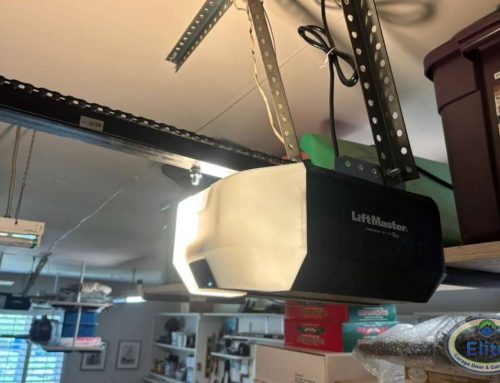
Once you’ve deleted the old network, press and hold the Wi-Fi or learn button on your garage door opener motor unit. This button is typically located on the back or side panel of the opener mounted to your garage ceiling. Hold it until the Wi-Fi indicator light begins blinking.
Return to your smartphone app and select the option to add a new device or reconnect. Follow the on-screen prompts to select your new Wi-Fi network from the available list and enter your new password.
What If Your Opener Won’t Enter Pairing Mode?
If pressing the Wi-Fi button doesn’t activate pairing mode, your opener may require a complete reset. Unplug the motor unit from the electrical outlet for 30 seconds, then plug it back in.
Wait for the opener to complete its startup cycle (you’ll hear the motor initialize and see the lights cycle). Then attempt the Wi-Fi pairing process again using the button on the motor unit and your smartphone app, similar to steps you’d take to Restore Your Garage Door Opener After An Electrical Surge.
Some older smart opener models in Snohomish County homes may require you to hold both the Wi-Fi button and the light button simultaneously. Check your owner’s manual or the manufacturer’s website for model-specific instructions.
Does Your New Router Use a Different Frequency Band?
Most garage door openers connect only to 2.4 GHz Wi-Fi networks, not the faster 5 GHz band that many newer routers offer. If your new router broadcasts both frequencies, make sure you’re selecting the 2.4 GHz network during setup.
Many modern routers in Lynnwood homes combine both bands under a single network name. If your router does this, you may need to temporarily disable band steering in your router settings or create a separate 2.4 GHz network specifically for smart home devices.
When Router Distance Becomes a Problem
Garages in Pacific Northwest homes are often detached or located on the opposite side of the house from the router. If your opener connected fine to your old router but struggles with the new one, the new router’s Wi-Fi signal may not reach as far.
Consider relocating your router closer to the garage, adding a Wi-Fi extender, or upgrading to a mesh network system. Washington’s rainy climate means many homeowners spend significant time in their garages during wet months, making reliable smart opener connectivity particularly valuable, especially if you’re planning to explore New Doors with integrated smart technology.
Professional Help When Technology Gets Complicated
Wi-Fi connectivity issues sometimes point to deeper problems with your garage door opener’s control board or antenna. If you’ve followed all troubleshooting steps and your opener still won’t connect to your new router, the internal Wi-Fi module may need professional diagnosis.
We repair and service all major smart garage door opener brands throughout Lynnwood, Bothell, Edmonds, and the greater Snohomish County area. Our technicians can quickly identify whether you’re dealing with a simple configuration issue or a hardware problem that requires component replacement, and we can help you explore options through our Door Designer if an upgrade is needed.
Contact Elite Garage Door & Gate Repair when your smart garage technology needs expert attention. We’ll restore your remote access and ensure your opener works reliably with your home network.